Figure 1: Click here for another page
showing more-detailed GPS receiver statistics. Left: A plot showing the paths of the
recently-tracked and currently-tracked satellites. The
receiver's location is the "bull's eye" in the center while
the top of the plot represents the North pole. Right: Graphs showing receiver statistics.
The red line shows the "EFC" value - the setting of
the electronic tuning adjustment which is an indication of how
far the Z3801's internal oscillator departs from GPS time and
the tuning required to correct it.
The green line - "Predicted Uncertainty " or "PU"
shows the expected accuracy of the receiver over the next 24
hours should the receiver lose its GPS lock.
The blue line ("T1") shows the short-term timing error
between the GPS signals and the receiver's internal
clock.
The pink line is a "smoothed" version the T1 value.
Finally, the brown-ish line across the bottom shows
the number of GPS satellites that have been tracked.
The above graphs were created by the GPSCon
program and are updated about once per hour.
Look at the bottom of this page for
recent news/info on the receiver's operation.
Note:
This page is intended to document only how I put my
system together and a few other miscellaneous items. It
should go without saying that there are probably better ways to
do these things, that your mileage may vary, blah blah blah...
Back in 2003 I bought a used HP Z3801A GPS receiver (often
called a "Z-Box") with the intent of using it as a
time/frequency reference. As with most projects, this one
was ongoing, with incremental progress dependent on available time
and current whim. Nevertheless, it didn't take too long to
get it up and running, following the "make it work, then make
it look good..." mantra.
Use as a frequency reference:
Why would one need a frequency reference?
A known-good frequency reference is handy for making sure that
everything else is on frequency. At this location (Utah)
reception of WWV on 10 MHz (the most convenient frequency for
calibrating against) is very sporadic and it is often difficult to
get a good zero beat owing to the constantly changing path and the
usual presence of WWVH.
Over the years the Z3801 has been invaluable for use as a frequency
reference. With it, I have been able to assess the stability
of OCXOs (Oven-Control Crystal
Oscillators) and Rubidium
references for use with microwave (10 and 24 GHz transverters) as
well as use its 10 MHz output as an external reference for a
frequency synthesizer to generate reference markers for use in the
ARRL Frequency Measurement Tests (FMT's) - among many other things -
and with accuracy that is greater than that which might be obtained
by almost any other means.
Uses as a time
reference:
The Z3801 is now monitored by an Aopen M-945D computer - a small,
form-factor desktop that draws only a few 10's of watts with a clock
speed of about 1.7 GHz.. Having a computer with a modest power
consumption allows it to be left on continuously without impacting
the electric bill much or too-quickly killing the UPS - and it has
enough horsepower to do about anything that would be required!
Via a USB-to-serial adapter, this computers interrogates the Z3801
and provides logging of the unit using the GPSCon program noted in Figure
1. It also provides a GPS-referenced SNTP Time server
which is used by the local Ham Shack computer which is helpful when
running programs that require accurate timing such as those in the WSJT
suite. The version of GPSCon that I use does not
use the 1pps signal from the receiver, but rather by determining the
time by querying the serial port. By this method the timing is
accurate only to within a few 10's of milliseconds - but that is
good enough for my purposes. Having a "local" SNTP time server
is nice as it means that I can query it several times an hour:
Most publicly-available internet servers do not allow more than a
few queries a day a given IP address!
Another use of this computer is to decode and process weather
satellite pictures: Those seen on my Weather
Satellite page are the result of this work and having a
continually-updated clock helps keep the maps accurate, too!
Important note concerning the use of serial ports under
Windows:
Regardless of the type of serial port adapter, when GPSCon is
used to query the GPS receiver it is necessary to go into the
"Advanced" settings of the serial port (in the "Device Manager")
and set the FIFO threshold of the UART to minimum or simply
disabling the FIFO buffers. Failure to do this will result
in wildly-fluctuating time synchronization from the GPS receiver
as serial-port response may be buffered in the UART and not be
read out in a timely fashion for accurate synchronization:
Doing this allows nearly real-time queries and responses with
apparent errors of only a few 10's of milliseconds. This
may be done by un-checking the box that says "Use FIFO Buffers"
and then hitting "Apply".
"What does this 'Signal Strength' (SS)
reading really mean?"
On the status screen of both the HP SatStat
program as well as GPSCon (see below) a signal
strength indication is given. All the Z3801
manual really says is that this value should be above
20-25 for reliable tracking, and it should be higher
than this for best accuracy.
In digging around the Motorola Oncore GPS
documentation (the receiver used in the Z3801) I
determined that this is an indication of "Signal to
Noise Density ratio" (S/No) and is shown in db.
What does this mean, then? This
explanation requires a bit of communications theory -
so I'll keep the explanation as simple as
practical:
Take a relatively weak CW carrier as an
example. If your receiver has a bandpass filter
1 kHz wide, let's say that the strength of the that CW
signal is the same as total energy in the noise
everywhere else in that 1 kHz bandpass. In this
case, one has a 0 db Signal to Noise ratio, for the
noise and signal are of the same total strength.
It would make sense, then, if you were to cut
your bandpass filter down to 100 Hz bandwidth, you'd still
be intercepting all of your original CW signal, but
you'd be intercepting only 1/10th as much noise.
In this case, the CW signal is now 10 db stronger
than the noise.
If you take it the other way, let's say that you
widen the bandwidth to 10000 Hz (10 kHz) - the
signal/noise ratio is now -10 db.
The GPS signal consists of several different
signals, all modulated atop the same carrier. If
all you want to do is recover the GPS receiver's
carrier (but no information) you could (theoretically)
use an extremely narrow bandwidth to detect
the carrier. For receiving the data, you need
wider bandwidth - a bandwidth proportional to the data
rate.
So, to keep lock on the GPS signal, a C/No ratio
of 20-25 db is the minimum required. This
represents a pretty "ratty" signal, however, and the
amount of noise present makes it difficult to recover
the data stream and timing with great accuracy.
As you might expect, increasing the the C/No will
reduce the amount of noise - and improve the accuracy
of the recovered timing.
How much signal is "enough?" As it turns
out, by the time one gets up to a C/No of 45-50 db,
enough of the uncertainty (noise) is gone and
relatively little improvement may be had
(comparatively speaking) by a further increase - at
least for the "typical" L1-only (non-differential) GPS
receiver.
As it turns out, most receivers don't go through
a lot of pains to obtain really good C/No values, so
it is more reasonable to take a "sliding average" to
get a picture of how well a particular satellite is
being received.
(I'm a bit skeptical about the receiver's
reporting, though: I have difficulty
believing that this parameter is, in fact,
accurate when it reports a C/No of >200 db...)
An interesting article that appeared in
GPSWorld that describes C/No as well as effects of
interference on GPS systems may be found here
The
Z3801 receiver:
The receiver itself needs several things to operate:
An antenna. This one is pretty obvious:
Because we are receiving satellite signals, this antenna should
be placed in a location that has a clear view of the sky.
Owing to the inclination of the GPS constellation being about 55
degrees (more or less) at this latitude one needs a northern
view clear to only about 70 degrees or so - but the views in the
directions of the other cardinal points should extend to the
horizon, if possible.
Power supply. These receivers "conveniently"
require a "48 volt" telephone-type supply (although some of them
may have been supplied with the option for a "30 volt"
input) In reality, "48 volt" supply typically operates
around 54 volts because they often consists of a number of
lead-acid cells in series maintained at "float" voltage.
When first powered up, the nominal current consumption is about
0.6 amps, dropping to 0.3-0.4 amps as the crystal oscillator's
oven(s) attain operating temperature.
RS-422 interface. The RS-422 interface is a
robust, high-speed scheme based on differential signaling.
For the 1pps and 10 MHz outputs (on the DB-25 connector) it
makes perfect sense - but it is somewhat awkward to interface
with the standard PC serial port. For this reason, many
'3801 users opt to make some internal modifications to invoke
the internal (but unused, by default) RS-232 driver
circuitry. Keep in mind that - if you wish the absolute
minimum propagation delay on the 1 pps output - RS-422 is the
preferred choice as RS-232 has, by definition, a comparatively
slow slew rate.
To make use of the receiver as an absolute time reference, one
needs a program to interrogate the receiver to discern the
current time. Typically, one interrogates the receiver for
the time and the receiver responds with the time that it will be
precisely at the leading edge of the next 1 pps output
pulse. Since a means of triggering on the 1 pps pulse
isn't available, the serial-port query method mentioned above
would have to suffice.
Taking these things one-at-a-time:
The "PBJ"
(Peanut Butter Jar) antenna:
Generally, an amplified (powered) antenna is employed with a GPS
receiver such as this with the receiver (usually) located at some
convenient distance - say, in the ham shack. Owing to the
very high frequency of the L1 GPS frequency (centered on 1575.42
MHz) typical coaxial cabling has high losses. Because these
losses directly contribute to receiver noise figure (and thus,
overall sensitivity) it doesn't take very much coax loss before
the GPS signal from an unamplified antenna disappears into the
thermal noise. Having an antenna with a built-in
preamplifier allows the receive system to tolerate significant
cable losses without degradation of the actual signal - a factor
that also translates to being able to use inexpensive,
smaller-diameter coaxial cable such as type RG-6 which is often
used for TV and satellite reception.
While a wide variety of amplified antennas are commercially
available, I decided to "roll my own" GPS antenna starting from
the article "An Inexpensive External GPS Antenna" by Mark Kesauer,
N7KKQ (QST,
October 2002, Pp. 36-39) - ARRL Members only link.
I constructed the turnstile antenna more-or-less described in the
article, departing from the article on several points:
A glass radome. The article suggested a plastic
cream cheese container as a radome (weatherproof cover.)
Typically, these are made from polyethylene - and not of a sort
that is likely to be stable when exposed to UV (Ultraviolet
radiation) from the sun - not to mention heat, cold, and
moisture for extended periods. Instead, I chose to use a
glass jar - specifically, one formerly containing Adam's [tm]
Peanut Butter - hence the name "PBJ" Antenna. Unless
broken, it is likely that the glass cover itself will long
outlast the rest of the system!
Slightly smaller-diameter disk. The diameter of
the jar wouldn't accommodate the suggested 4 inch diameter metal
disk. Instead, a disk approximately 3-3/8" diameter
(of double-sided printed circuit board material) was used.
Grounding. Since a piece of double-sided circuit
board was used rather than a solid disk of metal I soldered
small pieces of copper foil or wire at various points along the
edge of the board to electrically bond both sides. This is
in addition to the bonding achieved by soldering the
shield of the coax to both sides of the board.
An amplifier was added. Since my coax run was
going to be fairly long, I decided to add a MMIC-based
preamplifier at the antenna, powered by the receiver itself.
Additional shielding. Small pieces of circuit
board were soldered to shield the input circuitry of the
amplifier from the output circuitry to minimize the likelihood
of oscillation. This is probably not strictly necessary,
but it doesn't hurt...
The use of coax to support the antenna. The
article describes the turnstile elements being supported/fed by
a piece of transmission line constructed of circuit board
material - a reasonable homebrew approach. Because I
already had it onhand, I used a length of UT-141 semirigid PTFE
coaxial cable instead.
Figure 2 shows how the two turnstile conductors
(comprising 4 elements, actually...) are mounted atop the short
length of UT-141 coax. While not obvious from Figure 2,
the bottom end of the UT-141 coax goes through the circuit-board
disk with its shield soldered on both sides of the board.
Figure 2: View of the top side of the "PBJ" antenna. Click on the image for a larger version.
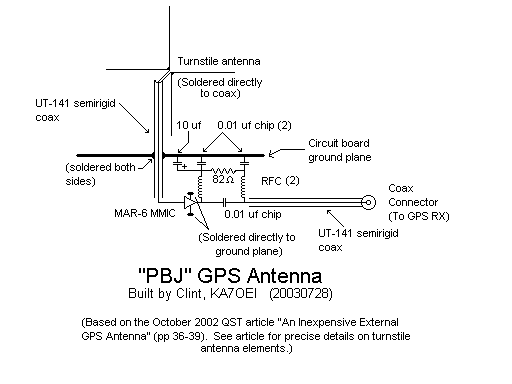
On the bottom side of the board is a simple preamplifier (see Figure
3) constructed using the inexpensive Mini-Circuits MAR-6
MMIC (see the schematic, Figure
5, below.) This amplifier has a moderate noise
figure (3-4 db) and reasonable gain (13-15 db or so) at this
frequency - enough to overcome reasonable coax losses. This
amplifier is powered from the 5 volts superimposed on the coaxial
cable: The DC is first decoupled with a coil with the RF
being blocked by a chip capacitor, then the DC is bypassed with an
electrolytic capacitor. Finally, DC is re-injected into the
circuit via another choke. Note that there is no blocking
capacitor in the input of the MMIC, so a small amount of DC (about
1.5 volts) is actually present on the antenna - but this isn't any
sort of problem.
The output of the amplifier is fed to another length of UT-141
coax which is soldered directly to an "N" connector (refer again
to Figure 2.) This piece of coax is used to support
the antenna and its circuit board, and the entire assembly is
"captured" by the glass jar. If preferred, one could use a
BNC or even an "F" type connector (if one used RG-6 coax, for
example) but in any case, one must assure that the connector is
adequately waterproofed upon installation.
Figure 4 shows the PBJ antenna installed on the
roof. In this installation, the coax (about 60' - or
approximately 20 meters of RG-11) is fed up through the center of
the pipe to which another antenna is mounted. The antenna is
secured partly by the weight of the coax pulling down, and partly
by the black nylon wire ties which tie to a mast clamp below the
GPS antenna. It is worth mentioning that while the antenna
mast to the right of the PBJ antenna (due south) somewhat blocks
the view to the south, it doesn't appear to have any significant
effect on the received signals.
Figure 3: A close-up view of the bottom of the "PBJ" GPS antenna.
(The antenna was turned upside-down for this picture.) Click on the image for a larger view.
As may be seen from Figure 2, some holes were drilled in the
"lid" (on the bottom) to allow ventilation. After the picture
was taken, small pieces of nylon window screening were glued into
place with RTV (to help keep out insects) and all of the pieces were
sprayed with clear lacquer to protect against the possible effects
of moisture and condensation.
In this case, ventilation is important: When placing a piece
of equipment outside, one must either hermetically seal it (usually
not practical) or one must provide ventilation
to avoid accumulation of moisture due to repeated condensation.
A layer of oil or grease was smeared over the metal lid's threads to
reduce the accumulation of rust and its "seizing" the lid onto the
jar making it difficult or impossible to remove. Finally,
electrical tape was applied at the joint between the lid and the jar
itself to minimize accumulation of moisture in the lid's threads.
How well does it all work? Surprisingly well. The
impedance mismatch of the 75-ohm RG-11 and the 50 ohm GPS input is,
in this application, inconsequential. Even though the loss of
the coax is around 6dB for this run, the signal strength peaks at
about 180-190 for satellites that are between 60 and 90 degrees
elevation and at 50-60 for those satellites that have gained enough
elevation to clear ground effects and clutter. In retrospect I
should have used ordinary RG-6 TV-type coaxial cable - with the
proper adapters, of course!
Figure 4:
The "PBJ" antenna as installed. Click on the image for a larger view.
Some eyebrows may be raised concerning the use of the MAR-6 as
the amplifier. True, there are more modern, lower-noise
MMICs around - and if you have one, by all means, use it!
The MAR-6 (also known as the MSA-0685) is relatively noisy at this
frequency - a noise figure of 3-4 db or so - but because the
current generation of GPS satellites have such strong signals, a
full-sized antenna that is in the clear gets plenty of
margin. Also, owing partly to aperture, a full-sized
turnstile antenna such as this is likely to intercept a little
more signal than a dielectrically-loaded (i.e. smaller) patch
antenna - something that can help make up a bit of lost signal.
In looking at the track map and statistics, the tracking ability
of the receiver/antenna system appears to be limited only by
horizon visibility. To the southeast and west/northwest,
visibility is somewhat limited by some tall trees - but in other
directions (due south, due east, southwest) only mountains
(elevations of <3 degrees, typically) limit the view.
During initial testing I'd seen the GPS receiver track satellites
as low as 4 degrees - but this was rare because there are usually
enough satellites at higher elevations and the receiver rarely has
to try to track those... Comparison of the
homebrew antenna with a commercially-made antenna:
For several weeks (ending 3/10/04) I used a commercially-made GPS
antenna instead of the homebrew. The antenna used was a
Magellan OEM-type of antenna (the round, white one.) The
results were observed to be as follows:
On the commercial antenna, signal strength was slightly higher
at lower elevation angles, but noticeably lower overhead.
The commercial antenna was much more affected by snow than the
homebrew one. This is no doubt due to the fact that even
when covered with snow, the sides of the large, glass radome of
the homebrew antenna were relatively clear.
The commercial antenna seemed to be unaffected by local 2
meter/70cm operation. This definitely indicates that some
sort of simple highpass filtering would be warranted on the
homebrew antenna.
After this test the original GPS module in the Z3801 became
"flaky" and would randomly lose its location so I replaced it
with an 8-channel Oncore receiver. During the
transplant, I noted that the original receiver had no
front-end bandpass filter - but the new one did. Since
then, the system is far more resilient to nearby transmitters!
The homebrew antenna is much less-affected by "birds
fade." For some reason, quails and magpies like to sit on
the antenna housing. For the same reason that snow doesn't
bother the homebrew antenna much, it's mostly unaffected by
this, whereas a bird pretty much covers up the commercial
antenna.
Comment: Many commercial GPS antennas have
"pointed" tops to discourage birds from roosting on
them. If you have a flat, "hockey-puck" type of antenna
and have noticed intermittent loss-of-signal that is due to
birds, you can also attach an upside-down funnel to the top of
the antenna - making sure that you plug the narrow end of the
funnel to prevent accumulation of water and insects.
Sure, the funnel may look funny, but birds won't sit on
it! (Note that many funnels are made from
polyethylene and many adhesives - such as silicone - do not
adhere to it well: You may need to get creative and
attach some ABS/PVS tabs or something like that with screws
to provide a "gluing surface.")
The mast supporting the DF array (see the picture) caused
blocking of the signal using the commercial antenna, but has no
noticeable effect on the homebrew antenna. This is likely
because the aperture of the homebrew antenna's turnstile is much
larger than that of the dielectrically-loaded patch antenna on
the commercial antenna.
Figure 5:
The schematic of the "PBJ" antenna. Click on the image for a larger view.
How well has this antenna held up? As noted below, I had
repeated problems with one solder-tack joint breaking loose (until
I
encapsulated it in clear epoxy) but it has been on the roof
since at least 2003 and shows no obvious signs of degradation.
Putting this antenna on the roof:
The best location for any GPS antenna is one with a clear view of
the eastern, western and southern horizons (or northern horizon,
if you are down 'unda, or both if you are nearing the
equator.) In North America and Europe, for example, the
inclination of the GPS constellation causes the minimum elevation
to be fairly high. In most cases, therefore, the preferred
location for mounting the antenna is on the roof.
What are the mounting options? A few come to mind:
A Chimney mount. These either anchor into the
chimney or, using bands, wrap around it. These work nicely
- if you have a chimney. (I don't...)
A tripod on the roof. These are available at many
home improvement and electronics-type stores and work
well. The "gotcha" with this is that one must often drill
a hole through the roofing material into the sheathing.
This is something that is best avoided - especially if your
roofing is somewhat old and is likely to crack upon the
tightening of the lag bolts. Clearly, one must waterproof
the final installation - something done with either tar or a
roofing sealant (often called "Gorilla Snot" owing to its black
color and it's tendency to stick to everything - and not
come off.)
Pipe mount. Most houses have a vent pipe, an
existing TV mast, a satellite TV dish mount on them: The
small size and weight of the typical powered GPS antenna means
that even of attached to a 1 or 2 foot length of pipe, the wind
load will be minimal.
Unfortunately, none of these are viable options on my roof::
At my house, all of the vent pipes (both of them...) are on
the northern slope of the roof and they already have things on
them. Also, a few things on the roof (the "swamp" or
evaporative cooler, for example) blocks a portion of the sky
toward the south. If a vent pipe is available, it is
recommended that it be as far away from other transmitting
antennas as possible!
I have no chimney (I mentioned that...)
My roof is metal. While this makes a great
ground-plane (I use it with my MedFER beacon, for example) it
has a problem with a "penetrating mount" (e.g. one that uses
lagbolts.) This metal roof is "floating" on about 1 inch
of foam. This is done not only to improve the insulation
value, but it also make for a level, uniform surface for the
metal of the roof, with the foam deforming to the slight
variations in the roof. Furthermore, since my roof was
originally gravel - and the original roof is still
present (albeit with the loose gravel removed) the surface is
especially rough. With this "floating" roof, bolting to
the underlying sheathing is rather difficult, owing largely to
the compressibility of the underlying foam. Finally, I'm
reluctant to do anything to risk the claimed 100 year warranty
of the roof...
The other option is a non-penetrating or "ballast"
mount. As the name implies, this sort of mount simply sits on
the roof, being weighed down for stability. These mounts are
often used to hold down the satellite dishes that are seen atop gas
stations and are used because they are relatively easy to deploy and
don't involve putting holes in the roof. These ballast mounts
are also available for the smaller direct-to-home satellite dishes -
although one may have to mail order it as they aren't always found
at local sources. For the GPS antenna, one of these types of
mounts - along with the requisite number of cement blocks - is
overkill and you are likely to lose your shingles before the mount
blows away!
You could also make your own mount from a metal plate sized to
accommodate two side-by-side cement blocks. Using angle
brackets and a piece of pipe, one can make a suitable mount for
small antennas. One would also use one or two pieces of
metal as a "strut" not only to stabilize the pipe but to make the
pipe sit vertical to accommodate the pitch of your roof.
Under this plate, one would put the protective mat, and atop the
plate, the two cement blocks: Two are recommended as they
form a "square" footprint, aiding in mechanical stability.
A few comments:
If you install a ballast-type mount, you must put down
something between the mount and the roofing to protect it.
Commonly, rubber roofing membrane is used (a suitable scrap
piece is often available for the asking from a roofer.)
Alternatively, you can just go to your home improvement store an
buy some doormats... This mat protects the original
roofing from scuffing and it helps to distribute the pressure
somewhat.
The company I work for has deployed hundreds of these
types of mounts to support transmit/receive Ku-band satellite
dishes, in sizes ranging from 1.2 to 2.4 meters. When
properly installed, there has never been a problem with
the mount. In those areas hit by hurricanes, it wasn't
uncommon to see a roof stripped bare of its covering - except
around the still-surviving roof mount.
Size the mount appropriately. For the GPS antenna, even
a tiny mount using, say, 2 cement blocks, will probably
suffice. Even for larger mounts, the weight is distributed
over such a large area as to be only a fraction of that cause by
a person walking on the roof. It should go without saying,
however, that with larger mounts involving hundreds of pounds of
ballast, the "point pressure" may be low but the overall weight
may require one to consider placement of the ballast mount over
a portion that is well-supported - especially considering snow
load, where applicable. (That is, avoid mid-spans of
rafters, etc.) For a small mount, this is inconsequential.
It is preferred to place the cement blocks so that the
openings are sideways and not straight up. This is done to
prevent accumulation of snow and ice - which can eventually
break the block apart - as well as preventing the accumulation
of debris such as leaves, etc. which can also trap moisture.
Figure 6 shows my particular installation. The "PBJ"
antenna may be seen (especially if the larger-sized image is
displayed) most of the way down at the top edge of the black ballast
mount bracket (follow the white cable down from the top...)
The antenna on top is actually a DF (Direction Finding) array, with
its top at about 8 feet above the roof. You may notice that
there are cement blocks under the mount as well as on top of
it: This was done because the metal roof has ridges (that is,
it is not flat) and these blocks are used to elevate the
ballast mount above these ridges.
Needless to say, these are suggestions: It is up to you
to do the appropriate research and take appropriate safety
measures!
Figure 6:
The GPS antenna on its ballast mount. See text for
more details. Click on the image for a larger view.
The power
supply:
After originally using a voltage-doubled 24 volt AC "wall wart" I
replaced it with a a cast-off "48 volt" 2 amp switching-type
supply from a telephone switch. A simple modification was
made to raise its voltage from 50 to 56 volts (the addition of a
parallel resistor which was done to keep the Z3801 happy.)
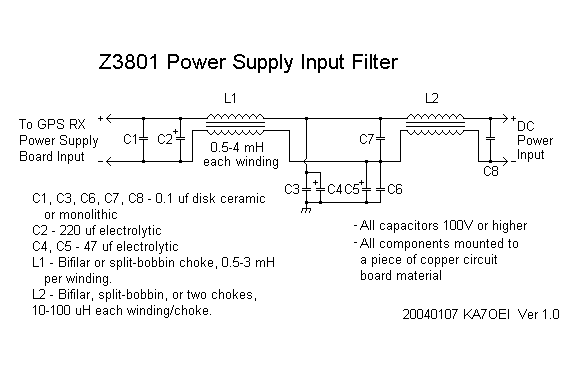
The supply was mounted in a metal box and "brute-force" L/C
EMI/RFI filtering (their circuits similar to that depicted in Figure
7) was added on both the input and output to keep its
switching supply noises out of my amateur receivers. In the
years since it was put into service, I have had no troubles with
it at all - but that should be expected from a high-reliability
device intended for telephone use.
There is one "gotcha" about using switching supplies with the
Z3801A: The Z3801A itself has a switching-type supply - and
like typical switching supplies, it has its own start-up issues:
You can't "soft start" many switching supplies - that is,
(relatively) slowly increase voltage from zero. Because a
switching supply is a power conversion device, it
will try to draw a constant amount of power from its
source. In plain English, its input current will increase
as voltage goes down. Sometimes, for whatever reason, they
won't "bootstrap" themselves and start running.
There is also another potential problem that compounds the
issue: Input filtering capacitors. These capacitors
(like all capacitors) present a (momentary) dead short
when fully discharged.
The upshot of all of this? If you are powering your Z3801 with
a switching supply, this outboard supply may, itself, have a "soft
start" circuit built-in: Upon application of line power, the
two switching supplies (the line-powered one and the one in
the '3801) may get "stuck" and not fire up. Also, unless it
has a rating significantly higher than the peak current consumption
of the receiver, it too may balk at the initial start-up
current requirements of the receiver - especially when trying to
charge the input capacitors as well..
The solution to this problem? Actually, the fix is a very
old one: Delayed start. If you power up the supply - then
connect it to the GPS receiver - it may do just fine. This
"delay" may be done with an old-fashioned relay and delay circuit,
or one could take a solid-state approach and use a transistor
(bipolar or MOSFET) switch.
Power supply
RFI:
As mentioned before, the Z3801 uses a switching supply to
generate its internal voltages. Actually, it uses several...
One of my "sub-hobbies" is LF/VLF listening. Several years
ago, with winter arriving and the summer static subsiding, I
decided to test my LF receive setup once again and was greeted
with a noise floor about 30 db higher than I was expecting.
Presuming that the antenna itself was having some problems, I
checked further and no, there wasn't a problem with the antenna at
all - but that it was an external noise source. It was now
time to start shutting things down and/or disconnecting things.
The "Ah Ha!" moment came when I disconnected the antenna from the
GPS receiver and the noise dropped 15-20 db. Shutting the
receiver off (something that I hate to do...) returned the LF
receive antenna system to its expected performance levels...
The Fix:
At this point, I knew what I had to do: Add a power supply
filter in the Z3801. Note that this racket was not
coming from the outboard AC supply mentioned above which I'd
already filtered, but from the Z3801 itself, via its DC power
connector/cable.
Removing the top cover, the obvious place to mount a filter was
in a clear spot against the back panel - next to the power
connector, so I carefully cut a piece of circuit board
material to the maximum size that would fit in the space and
mounted it with two screws.
Note: When drilling holes in the Z3801 case,
turn the receiver upside-down so that all filings will not
fall onto the circuit board. Then, before righting it
again, de-burr the holes with a larger drill bit and vacuum
all the filings from the tabletop and the inside/lip of the
chassis. Failure to do this will likely result in
hair-pulling intermittents or overall failure of the receiver
as the filings will likely find their way onto the boards and
under components!
Then, the power connector was removed from the chassis and
disconnected from the input on the power supply board. I
then carefully "un-crimped" the "board-end" of the internal power
cable and soldered longer wires to it - although I could have
simply cut and spliced. Doing this gave me a long enough run
of wire to go from the power supply input to the (to be added)
filter.
Effective filtering at VLF/LF/MF frequencies isn't as
straightforward as it might seem - especially when higher currents
are involved. Too often, I have seen hams simply slap
ferrite beads on QRM sources - only to be disappointed when doing
so wasn't particularly effective. Furthermore, simple
ferrite beads and snap-on chokes only have effects above several
MHz anyway and will do absolutely nothing at VLF/LF and MF
frequencies and are only mildly effective at HF in most cases.
The Filter:
Referring to the schematic in Figure 7, L1 was salvaged
from a computer power supply. Typically, these chokes come
in three flavors: A bifilar-wound toroidal choke, a toroidal
choke that has a winding on each half of the core, or one that
looks like a small, square power transformer with two distinctly
separate windings side-by-side. In either case, both
windings are tightly coupled together and any common-mode energy
passing through them is suppressed significantly. If you
have a means to do so, make certain that this choke has
quite high inductance: The choke that I used measured about
1.5 mH (that's Millihenries) per winding and thus has
enough inductance to offer significant reactance at LF frequencies
(nearly 100 ohms at 10 kHz.) If you don't care about
frequencies that low, then a choke with lower inductance may be
used. Remember: We are trying to keep LF
energy from the switching supply inside the GPS receiver
from being conducted onto the power cable!
Figure 7:
Schematic of the power supply input filter. Click on the image for a larger version
As mentioned before, capacitors C3-C7 re-assert common-mode signals
and ground them out and by this time, LF energy is mostly quashed by
L1 and is then routed to "ground." Both electrolytic and
ceramic capacitors are used to help guarantee that both low and high
frequencies are bypassed.
L2 can be either a choke similar to that of L1, or it may be two
smaller inductors. Their primary purpose is to keep HF out
of the receiver and thus, the inductance of each winding (or
inductor) may be in the 10-100 uH range (or higher, if you
wish.) Finally, C8 is used to make any energy entering (or
exiting, for that matter) the GPS receiver's power supply
common-mode. Resist the temptation to connect a capacitor to
ground at this point because any RF energy entering on the power
supply lead will find it as a low-impedance path to the
chassis: Let L2 do its job and choke it out, first!
Finally, make certain that all capacitors that you use are rated
for the voltage: Ratings of at least 100 VDC are recommended
on all capacitors. If you don't see a voltage
rating plainly printed on the component, don't use
it!
Results:
The results of adding the filter were good: No detectable
noise on LF, MF, or HF emanates from the GPS receiver anymore!
Other modifications -
Improved heat-sinking of the power converter modules:
While I had the GPS receiver apart I decided to make another
modification: The addition of more heat-sinking to the
DC-to-DC converters inside the GPS receiver.
These are flat, square-ish modules with obvious printing on them
indicating their input and output voltage ratings. During
testing, I couldn't help but notice that they were "hotter than
hell" - too warm to touch comfortably. Knowing that the
reliability of any electronic device is inversely proportional to
its operating temperature I decided to do something about it.
Rummaging around the junkbox I found a few small CPU-type heat
sinks. Noting that the DC-DC converter modules already had
tapped holes in them for mounting, I found some mating machine
screws in my hardware collection and, along with white heat-sink
grease, I attached heat sinks to these supplies.
The result was that the temperature of these modules went from
"too hot to touch" to just "very warm" - a definite improvement!
Knowing that doing so would make the receiver potentially
more-sensitive to variations of ambient (room) temperature, I
resisted the temptation to put a small DC-powered fan inside the
case!
The RS-422
interface:
One popular scheme is to utilize the Z3801's built-in RS-232
circuitry. Although installed, it is not connected by
default - a process that takes some minor surgery to
complete. Because this procedure may be found on the K8CU
page (see below) it is not detailed here.
Jamming myself...
Several years ago, I was hiking with a group of
hams, and we happened to be using a simplex frequency
of 146.52 MHz. I also happened to have my GPS
receiver with me (back then, a Magellan GPS-4000 -
non-XL version) turned on. I couldn't help
but notice that it didn't seem to be working very well
at all: It was constantly losing lock on all
satellites.
When we stopped for a break, I happened to let
my HT (a Yeasu FT-530) do it's timed auto
power-off: Since our group was all together in
one place, there was no need to leave the radio
on. I then noticed that my GPS receiver was
working normally.
Putting two-and-two together, I surmised (and
later verified) that the '530 was, in fact, jamming
the GPS receiver. Here's how:
At 146.52, the FT-530 uses low-side injection
for its local oscillator. With an IF of 15.25
MHz, this places the LO at 131.27 MHz - the 12th
harmonic of which is 1575.24 MHz - almost exactly
on the L1 GPS frequency of 1575.42 MHz.
Apparently, when the GPS receiver and the HT are
within a few feet of each other, there's enough LO
energy present to "jam" the GPS receiver!
The cure for this problem? We now use a
147 MHz simplex frequency - which isn't as busy,
anyway...
There are also numerous schemes to convert RS-422 levels to RS-232
levels - also found on the K8CU page. If you are in a real
hurry, however, you can do a faux conversion using
just a single (optional) resistor:
Connect RS-232 ground (pin 5 on a DE-9 connector) to pin 7 of
the Z3801's DB-25 connector
Connect RS-232 receive data (pin 2 on the DE-9) to pin 2 of
the Z3801's connector
Connect RS-232 transmit data (pin 3 on the DE-9) to pin 3 of
the Z3801's connector via a 470 ohm
resistor. This limits the current from the RS-232 driver
into the RS-422 receiver. It is probably not necessary,
but it doesn't hurt...
There are several caveats with this method, however:
Keep the cable very short! The voltage swing on the
RS-422 is definitely not within RS-232 spec. The
capacitance of long cables can degrade the data and cause
errors.
It may not work very well - or at all for you! Because
of the minimal voltage swing, it may not even cross the
threshold of the RS-232 receiver in your computer in a reliable
manner and is thus subject to noise. When I was testing
USB-to-serial converters, I noted that one of them didn't work
with the faux-232 signal levels at all so I used a different
converter.
Use it only as a temporary measure (e.g. a "kludge")
if you haven't a means to convert the receiver
immediately. Actually, I've been meaning to build an
adapter, but since the faux-232 has been working fine for years,
I've not gotten around to changing anything...
Do expect the occasional communications
errors. This scheme is, by no means, robust - for all of
the reasons above.
Reread the above!
A question that may come to mind is, "Why use RS-422 in the first
place?" The question is one of robustness. RS-422 is a
differential signaling scheme - that is, each signal is
transmitted on a twisted pair - with the two conductors carrying
equal and opposite signals. This has the advantage of being
able to handle "common mode" interference without corrupting
data. What is common mode interference? Simply put, a
common mode signal is one that travels down the pair of wires in
unison - that is, not differentially. The common mode
signal, affecting both wires equally (in ideal cases) is ignored
by the receiver - which is looking only at the difference
between the two wires.
Because of the differential nature of this scheme, it is possible
to run RS-422 signals for miles - the distance being
limited mostly by the high frequency response of the wire pair
limiting the data rate. A note here: Even though
RS-422 doesn't use the "ground" wire for signaling, per se, one is
strongly recommended to limit the swing of the common mode signals
on the wire pair to a level that the receivers can handle.
Another important reason for using RS-422 over RS-232 is that '232
has in inherently slow slew rate - that is, it can't swing very
fast. While RS-422 is capable of carrying signaling rates of
several megabaud (for short distances) this simply isn't the case
with RS-232. What this also means is that if you want to use
the GPS receiver for absolute timing accuracy with the 1PPS output,
you don't want to use the RS-232 output unless you take into
account the "slowness" of the RS-232 hardware - and the likelihood
that this reference is likely to drift around a bit as thresholds in
the RS-232 hardware change with time and temperature. This
isn't likely to be too much of a problem for the vast majority of
users, as the difference is only likely to be a fraction of a
microsecond, anyway...
All of that being said, I've been too lazy to build an
RS-422<>RS-232 and have stayed with the "kludge" from the
beginning. The only "problem" that I had was when I recently
interfaced the receiver with a computer that had no built-in
RS-232 port and I had to use a USB<>RS-232 adapter.
When doing this I noticed that the more-expensive Belkin adapter
didn't work at all, but the cheap, no-name adapter that used the
"Prolific" chipset has worked perfectly and with no errors at all.
Use as a time
reference:
It would be nice to be able to, say, drive a clock and
supply GPS information to a host computer. Being that there
is only one serial port on the Z3801, one would have to multiplex
both systems in a manner that the Z3801 can support. I'm
currently working on a PIC-based controller that will do the
following:
Interrogate the Z3801 for time and synchronize with the 1pps
signal
Make this time/date information available in a format of my
choosing.
Buffer transmit/receive queries from a remote computer - such
as one running GPSCon - and multiplex these queries with those
from the PIC itself. Of course, the PIC could "eavesdrop"
on such communications and use any data that it might need
anyway...
As noted above, I use the GPSCon program to both gather statistics
from the Z3801 as well as provide a local NTP service.
Status of the GPS receiver at
KA7OEI:
- April 2015: No changes - everything is still working!
- March 2013: Making the GPSCon
SNTP server work under Windows 7
No problems for a while other than the fact that
my web page provider stopped supporting FTP - the only
protocol that GPSCon "knows" about. The
work-around was to write a script for the "WinSCP"
program that would use SCP (Secure CoPy) to relocate
the file from the directly defined in GPSCon to the
appropriate place on the web server. Every hour,
a scheduled task (under Windows XP) fires off a batch
file that causes the files on the web server to be
updated.
I also help a friend get GPSCon working properly
on his Windows 7 machine and this was a multi-step
process to permit it to function as an SNTP server and
allow GPSCon to set the system time. If you
don't do this properly, you can get this cryptic error
in GPSCon that says something like "Cannot set time
from F2" (or something close to that...)
1. GPSCon must be set to "Run as
Administrator" if it is to have permission to twiddle
the system time and/or be an SNTP service. This
can be done manually (e.g. right-click and select "Run
as Administrator") or, better yet, after
right-clicking, go to Properties and set this program
to always be run as an administrator. If
you want the program to start when you boot the
computer, you can set this as a scheduled task - but
make sure that you set administrator privileges there
as well!
2. You must STOP the Windows Time
service. To do this, under the "Start" button
enter "services.msc" on the line where you enter the
name of a program. Once the program comes up,
look for "Windows Time" and then right-click on it,
select Properties and then press the button that says
STOP. You must then go up to the line that says
"Startup Type" and select "Manual" so that it doesn't
start again when you boot up. REMEMBER:
Once you stop this service, your computer cannot
every synchronize itself to internet time again
until/unless you re-enable this service (e.g. start it
and set it to "Automatic.) If the GPSCon program
is always started on bootup and synchronizes
itself to your receiver, your system time will always
be properly set, but if you don't do this, it
will drift off!
3. In GPSCon, you should verify that you
are getting good time response from the GPS receiver
and that you have actually enabled SNTP. One
thing for which you should check on GPSCon is that
your main status screen says on it, just below the
time and date, "1PPS CLK Synchronized to UTC".
If it says that it is synchronized to GPS it will be
16 seconds off (as of March 2013) and one must issue
the command " :diag:GPs:utc 1 " (Include the colons,
but not the quotes) and then reboot the GPS receiver
for it to take effect. Remember that in
resetting the receiver, it will take a day or three to
fully re-synchronize and settle in again!
4. If you want to use the computer on
which GPSCon is running as a local time server, it must
have a static IP address, and it would be this address
that you set in other computers (including Windows
boxes) as the source for the internet time.
Windows XP and 7 are both perfectly happy with getting
their time from an SNTP source such as the GPSCon
program!
5. REMEMBER: As noted above, you
should set your UART FIFO to zero bytes or, better
yet, un-check the "Use FIFO Buffers" box un the
"Advanced" properties under the serial port in "Device
Manager". Failure to do this will induce random
delays/offsets in the computer's synchronizing to the
GPS receiver since the FIFO will take some finite (and
essentially random) period to time out.
6. In the configuration screen in GPSCon
there's a setting for the delay between the "real"
time and what GPSCon is able to discern from the
receiver. Because it does not look at the 1PPS
pulse from the receiver, GPSCon has to quickly query
the receiver to determine when the second changes, and
this has a bit of a delay which may be compensated by
this value. I've found that the default value is
"pretty close" and is likely good enough for most
applications. One should also be aware that most
programs that display the system time (such as the
Windows' built in clock) doesn't necessarily update
the clock exactly on the second, so if you were to
listen to WWV and watch the clock, it may be slightly
off. There are other programs that can more
quickly query the clock and updated it, one of which
is the WSPR program, which seems to do a decent job of
minimizing the delay between the display and the
system time. If you feel adventurous, you can
tweak the delay value in GPSCon to dial this in as
good as it will get, but don't expect it to
consistently be better than a few 10's of
milliseconds! (Re-check your FIFO settings
if you find the time wandering about by more than,
say, 100 milliseconds!)
I've been using GPSCon to synchronize some of
the computers at home (e.g. the ones that stay there)
for several years now. One advantage of having
your own time server is that is you use an amateur
radio mode like WSPR that requires good time
synchronization to work properly, you can query your
local time server many times per day: Many
public time servers will not allow you to
query them more than once or twice per day!
- March 2011: Two problems:
1. It looks as though the "PBJ" antenna
has gone intermittent again. So far, it only
seems to do it for a short time, when it is
cold. As noted before, this could have been
prevented at the beginning by better-connecting the
MMIC's input lead to the UT-141 coax center
connector. When the weather is nice - and I have
more time - I'll pull it off the roof to see if it's
that same problem, or maybe a problem elsewhere.
Comment:
After a few weeks, it stopped dropping out, so it
may have been snow-related. If it happens
again in the summer I'll pull it down and take a
closer look.
2. I (think that I) finally solved a
problem that showed up with the new computer - and had
showed up on the old one, too. Since computers
no longer routinely come with RS-232 serial ports, I
had to use some USB<>Serial adapters. I'd
tried this on the old 366 MHz laptop with its single
built-in serial port, but when I tried to use a USB
adapter, it would crash after a while. I just
chalked that up to problems with the old computer and
Windows 98SE.
When I switched to the "newer" computer (1.7
GHz) which had no RS-232 ports at all, I had
to use a serial port for the WX Satellite receive and
another for the GPS receiver. As noted above,
the Belkin didn't talk to the "Pseudo RS-232" level
from the RS-422 port on the GPS receiver - but the
no-name "Prolific" chipset-based adapter did!
All was well for a while - and then I started to
get more and more "BSOD" crashes with a cryptic
"USB_BUGCODE_DRIVER" error. By the process of
elimination, I determined that it was the Belkin
USB<>Serial driver. Putting another
generic "Prolific" chipset driver on there solved the
problem - and it was likely the same problem on the
W98SE computer.
It seems as though, if you were to put the same,
identical USB device on the same physical USB port
(this may not apply to an outboard USB hub, though)
then it will uniquely identify it for that USB
port. In other words, if you put a particular
USB<>Serial port on, say, the 1st USB port and
assign it COM1, it will ALWAYS be COM1. If you
move it to the 2nd USB port and assign it to COM2, it
will always be COM2 when plugged in that USB
port. (Note: To pick your COM port you
must force it to the desired COM port in the
hardware configuration screen or else it may just
pick the next-available COM port - usually a high
number like "COM5" or above. Note that the
"Com port already in use" warning you may get can
refer to a USB<>Serial port that had been
previously installed - but not necessarily one that
is plugged in at that moment! In other words,
if you EVER had a COM1 in the past, it will mark
that is "in use".)
The advantage of having two different-brand
USB<>Serial adapters is that they will never
be confused with each other as the computer cannot
mistake them for each other. In this case,
however, since I ended up using two "Prolific"
USB<>Serial adapters, I just had to make sure
that I always knew that "COM1" was associated with one
USB port and that "COM2" was associated with the
other. (Unlike
other reports, I've had no problems with the
"Prolific" chipsets on XP... 'dunno...)
- January 2011: After being online
for about 8 years everything continues to work fine -
including the "PBJ" antenna, which has been in the
weather, on the roof for just as long! The
receiver is now being monitored full-time as I now
have a low-power computer dedicated to the task - one
which also provides a local SNTP server for digital
modes - see above.
I also noted the GPSCon wouldn't always start up
in the "running" mode when the computer came up after
a power bump: While I'd scheduled GPSCon to be
started just after auto-login, it just came up in
"idle" mode which meant that it wasn't pulling the GPS
receiver, providing SNTP service or collecting log
data.
Looking at the GPSCon web page I noticed that
the very next version after mine
included a check-box to auto-start the program - but
I'm a bit reluctant to pay for yet another upgrade for
a program that hasn't been updated recently and
wouldn't offer any other feature that I don't
currently need.
What seems to have worked as a "fix" is to go
into the registry and set a key. Using Regedit,
I went to:
HKEY_CURRENT_USER, Sofware, GPSCon, Initial,
Was Running
and changed that value from 0 (zero) to 1 (one.)
So far, so good... mostly... After a power
interruption it failed to come up automatically on one
occasion - and the above registry key had changed back
to zero: I suppose that I could have the
registry entry automatically be written when the
computer boots, but I now have my UPS working properly
so there shouldn't be as much need to restart the
computer.
- March 2008: Not much to report,
really: The "PBJ" antenna and the Z3801 continue
to work. Note that the computer connected to the
Z3801 is not used very much, so the graphs on this web
page are not updated vary often. I had one more
instance of the solder tack joint breaking loose as
described below, but I repaired it and then
encapsulated the joint with clear epoxy.
- July 2004: I recently had some trouble
with the Oncore GPS module: After a power cycle,
it would never lock and making it load defaults
resulted in it believing that it was in an impossible
location (e.g. at "596 degrees west and east at an
altitude of 13k miles or so) and due to "bad geometry"
the survey would never complete. I remedied this
by building an interface to power the Oncore module
and connect it to the computer and, using the Motorola
"WinOncore" program was able to reset the
receiver and successfully test it. Upon
re-installation, it again exhibited some strange
behavior - but I was able to work around it. (It
may be heat-related: Further investigation is
warranted.) Update:
I was able to find an 8-channel Oncore unit and
installed it - along with a "super-cap" to hold the
RAM during power failures - in the Z3801, solving the
receiver problems. I also noticed
previously-noted susceptibility to about any VHF or UHF
transmission from my shack causing the receiver to go
into holdover was now gone - probably related to the
fact that the new receiver had a bandpass filter and
the old one did not!
- March 2004: For several weeks
(until 3/10/04) I was using an OEM Magellan GPS
antenna to compare it with the homebrew unit.
The results of this testing are in the text, above.
- September 2003: On about
9/27/03, I fixed the GPS antenna. For some weeks
prior to this, I'd intermittently lose all GPS
signals. The problem got worse - to the point of
total loss, but I didn't have time to look at it until
the 27th. The problem turned out to be a solder
tack joint had failed where the UT-141 coax from the
turnstile connected to the input of the MAR-6.
This change was done as part of the
"permanentizing" of the receiver installation.
Much work remains to be done...
- May 2003: Initial installation of
the Z3801.
Additional
comments:
One problem that I need to address is receiver jamming.
When I operate 2 meter SSB, for example, the receiver loses lock
on all satellites. Why is this? There are several
possible explanations:
The preamplifier. The amplifier itself is a MAR-6
connected to the turnstile. This amplifier is
intrinsically extremely wideband and it is entirely possible
that the 1.5 GHz turnstile is picking up enough energy from the
2 meter antenna (about 20 feet away) to be overloaded.
The GPS receiver itself may be being overloaded. Even if
the MAR-6 isn't being overloaded, it is entirely possible that
the GPS receiver itself is. The MAR-6 amplifier could be
amplifying enough 2 meter energy to cause this to happen.
Weak harmonics of the 2 meter signal. The 11th harmonic
of 2 meter SSB operations (around 144.200-144.300) land "kinda
close" to the L1 GPS frequency.
What to do about this? In the first case, I could build a
simple GaAsFET amplifier to replace the MAR-6. By necessity,
the GaAsFET would have a matching network on its input - and it
would surely have enough out-of-band rejection to prevent
significant VHF/UHF energy from entering the preamplifier
itself. This "fix" would also take care of the second
situation (overload of the GPS receiver itself) at the same time.
As it turns out, I answered the question (at least partially) by
substituting the homebrew antenna with a commercial one.
Because the commercial antenna was unaffected by the presence of a
2 meter transmitter, the "theory" that weak harmonics are the
culprit was discounted. It could still be that the
amplifier and/or the receiver itself are being overloaded by the
presence of the local 2 meter signal.
What if it is the second situation? A simple bandpass
filter stuck inline (a relatively tightly-coupled 1/4 wave cavity
filter) would take care of the problem. The "awkardness"
here is that I'd have to feed the DC (for the amplifier) around
the filter. (I'll probably just build a GaAsFET preamp
and avoid the problem...)
What about the last one - weak harmonics of the 2 meter
signal? Because I don't think that this is likely to be too
serious a problem, I haven't given it much thought. In
reality, the occasional nature of the SSB operation - and the fact
that the receiver seems to recover nicely from "holdover"
(resulting from loss of GPS lock) may make it so that I'll just
live with the problem...
(Again, since I replaced the original GPS module in my Z3801
with one that used a bandpass filter, the loss-of-lock that
occurred when a local transmitter was used is now very rare.)
Now, I wonder how things will work when I fire up my 23cm
transverter???
This page will be updated as time goes on - check back
later...
For more info on the Z3801A, the GPSCon
program and other GPS receivers used as time/frequency
references, go to K8CU's page at:
This page and its content copyright
2004-2013 and maintained by Clint
Turner, KA7OEI and yes, I know the background is for the
MedFER beacon... Any trademarks are the property of
their respective owners. This page last updated on
20130304